
Testing your audio transcription skills
We use Heidi Health for the transcription of audio and video files. We no longer physically type onto a Word document while listening to the audio.
Set yourself up a free account on Heidi Health and then follow these instructions on how to use it as a test.
First job – download the podcast from this link and save it on your desktop – https://web.tresorit.com/l/j9Wqo#Q0WHnIobBV73h8d3Rpc_pg
INSTRUCTIONS
Click on ‘New Session’ in the top left corner.
Then on the right-hand side Click on arrow down at the side of Transcribe and select ‘Upload session audio’
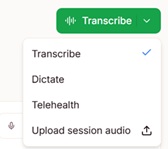
A box will appear asking you to drag your file over or upload the recording – use podcast we asked you to download.
Type in a name e.g. Podcast to transcribe’ in the ‘Search or generate anything’ box like below – then press ‘return’
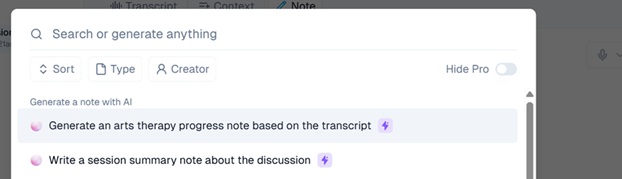
You will see that Heidi automatically types of the podcast for you.
From this you can click on the ‘Copy’ button on the right-hand side and put this onto a Word document ready for you to read and check through.
You can also create a transcript from the podcast. At the bottom you can type in a message, then click on the little arrow at the end:
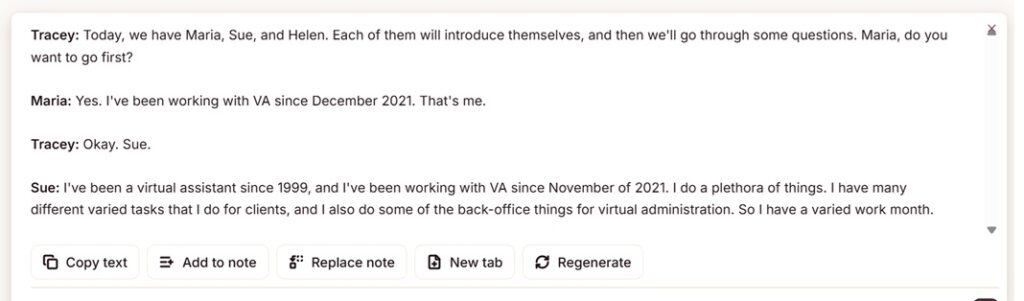
Create a near verbatim transcription identifying the speakers. Make more coherent and remove any waffle.

From this you should see this, showing the typed version with the names of the speakers against each sentence.
We hope this works well and you’re impressed with using Heidi Health.
Go back to Main Page